VigiGym Review - The Minimalist Workout Tracker That Gets Out of Your Way in 2025
We've tested VigiGym, a minimalist workout tracker for iPhone and Apple Watch built by a solo developer with 30+ years of lifting experience

Welcome to this VigiGym review 😊!
In a world of bloated fitness apps trying to be your coach, nutritionist, and social network all at once, finding a workout tracker that simply does its job can feel impossible. Most apps overwhelm you with features you'll never use, while the good ones lock basic functionality behind expensive subscriptions.
That's where VigiGym comes in with a refreshingly different philosophy: just get out of your way. Built by Achim Loobes, a solo developer with over 30 years of lifting experience, this iOS-exclusive app focuses on one thing - helping you log your workouts with zero friction.
What drew me to VigiGym wasn't its feature list, but its approach. No cloud sync, no social feeds, no AI coaching - just a clean, fast interface that lets you track sets, reps, and weights without thinking about it. In this review, we'll explore whether this minimalist approach actually delivers, and if VigiGym can become your go-to gym companion 🏋️!
Getting Started & First Impressions
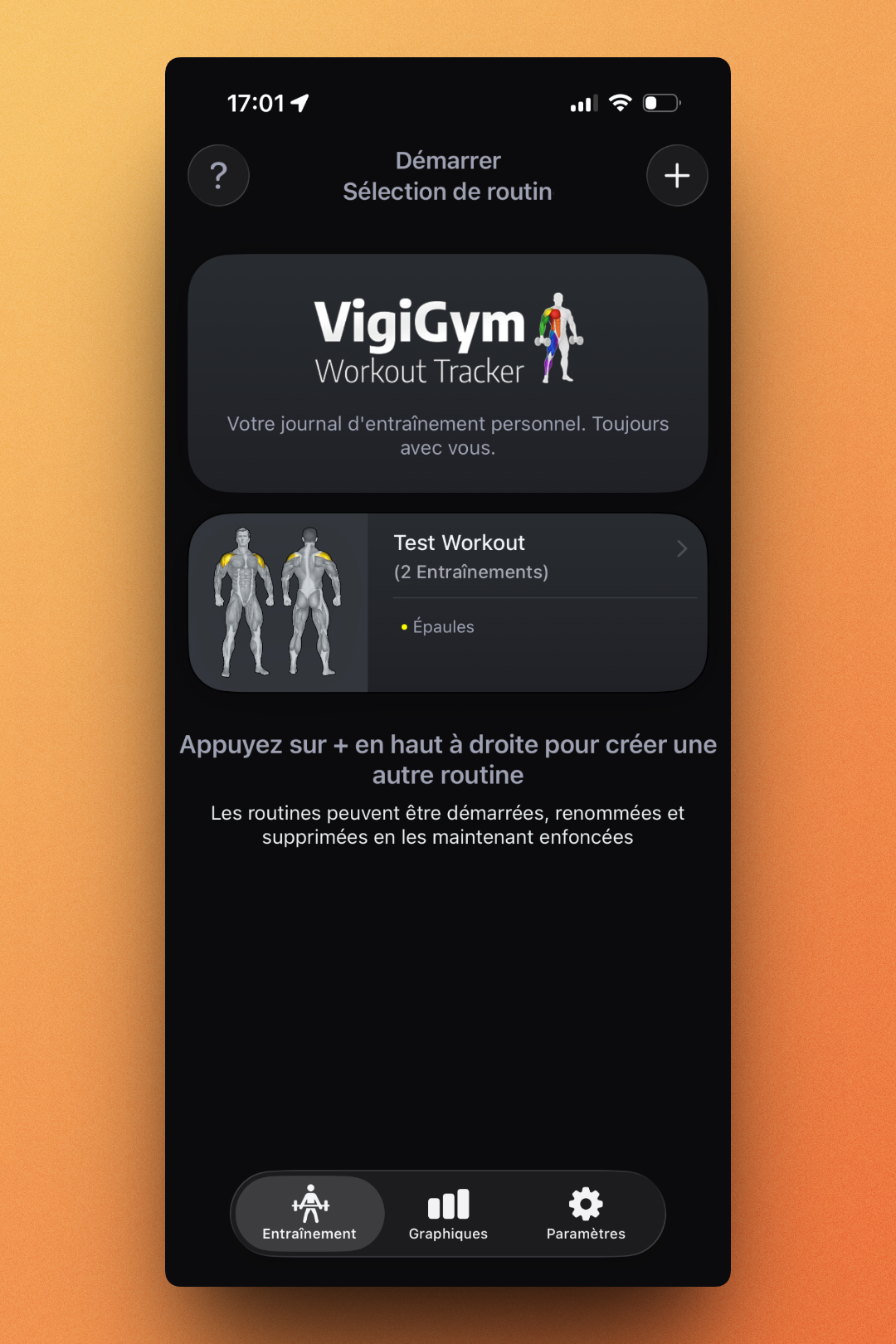
The moment you open VigiGym, you immediately understand its philosophy. The home screen presents your routines in a clean, dark interface with the tagline "Votre journal d'entraînement personnel. Toujours avec vous" (Your personal workout journal. Always with you). No onboarding tutorial bombarding you with tips, no requests to connect social accounts. Just your routines, ready to go.
Creating your first routine is straightforward: tap the + button, name it, and start adding exercises. The app comes with 242 pre-built exercises, each with detailed muscle mapping that shows exactly which muscles you're targeting. This is where VigiGym's attention to detail really shows - the developer personally edited every exercise image to highlight targeted muscle groups in a consistent color scheme.
Exercise Selection - Where VigiGym Shines
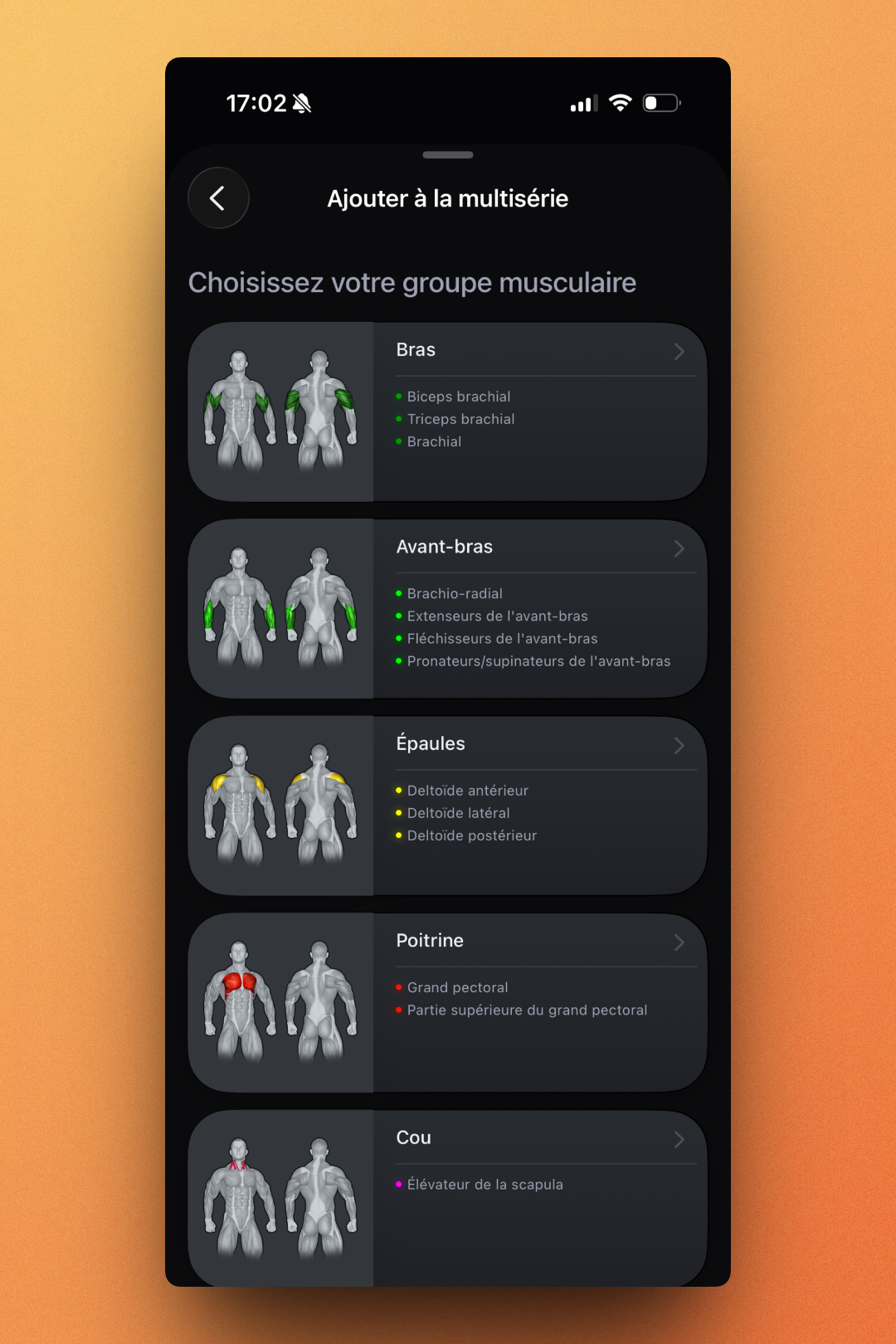
Adding exercises to your routine reveals one of VigiGym's strongest features: its visual muscle mapping system. When you want to add an exercise, you first select the muscle group you want to target. Each group displays color-coded anatomical illustrations showing primary and secondary muscles.
For example, selecting "Épaules" (Shoulders) shows you the three deltoid heads: anterior, lateral, and posterior, each highlighted in different colors. This visual approach makes it incredibly easy to ensure you're hitting all the right muscles in your workout.
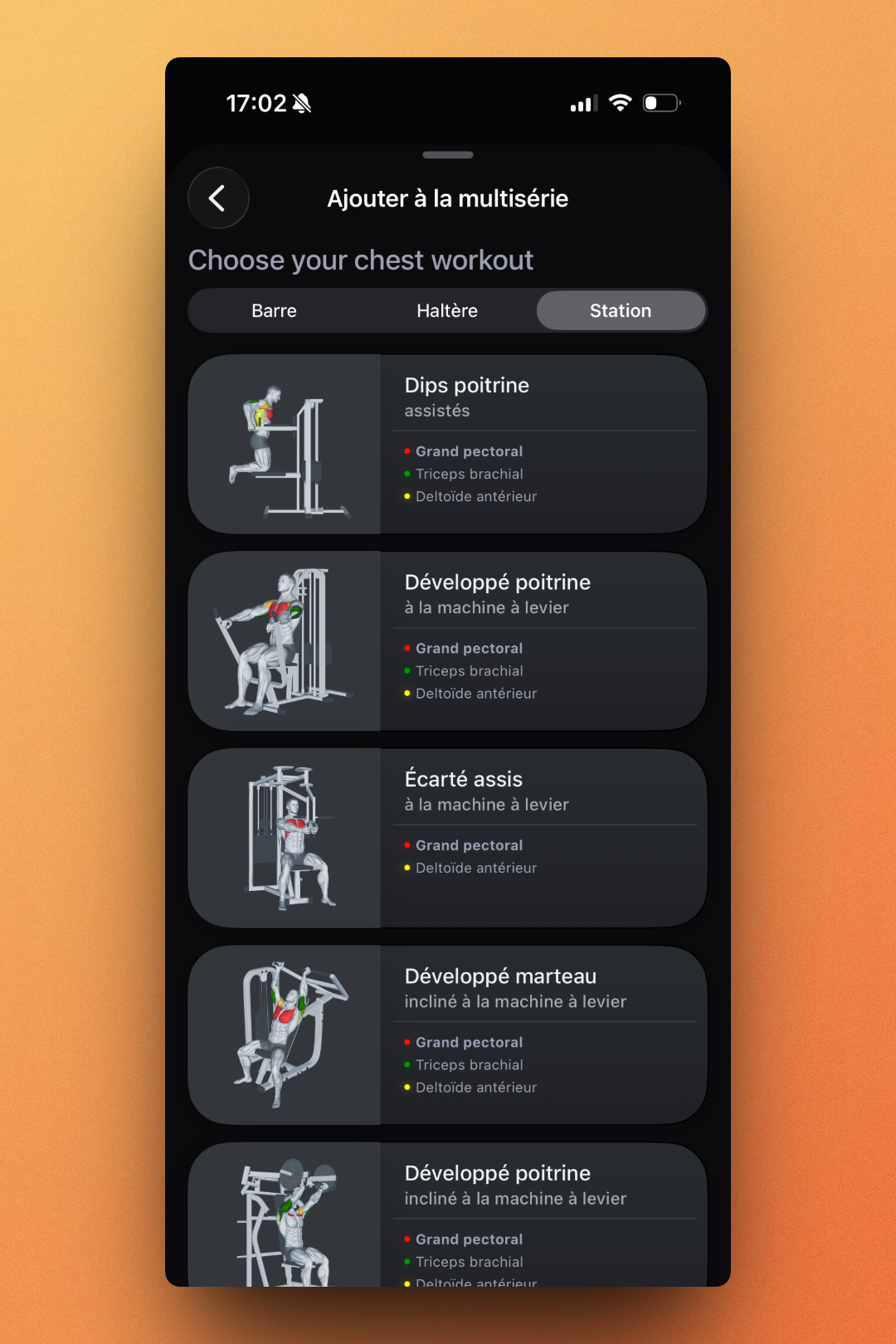
Once you've chosen a muscle group, you can filter exercises by equipment: Barre (Barbell), Haltère (Dumbbell), or Station (Machine). Each exercise card displays the movement illustration along with the muscles targeted, color-coded by intensity. It's a smart system that helps you build balanced routines without needing to memorize anatomy.
Workout Configuration
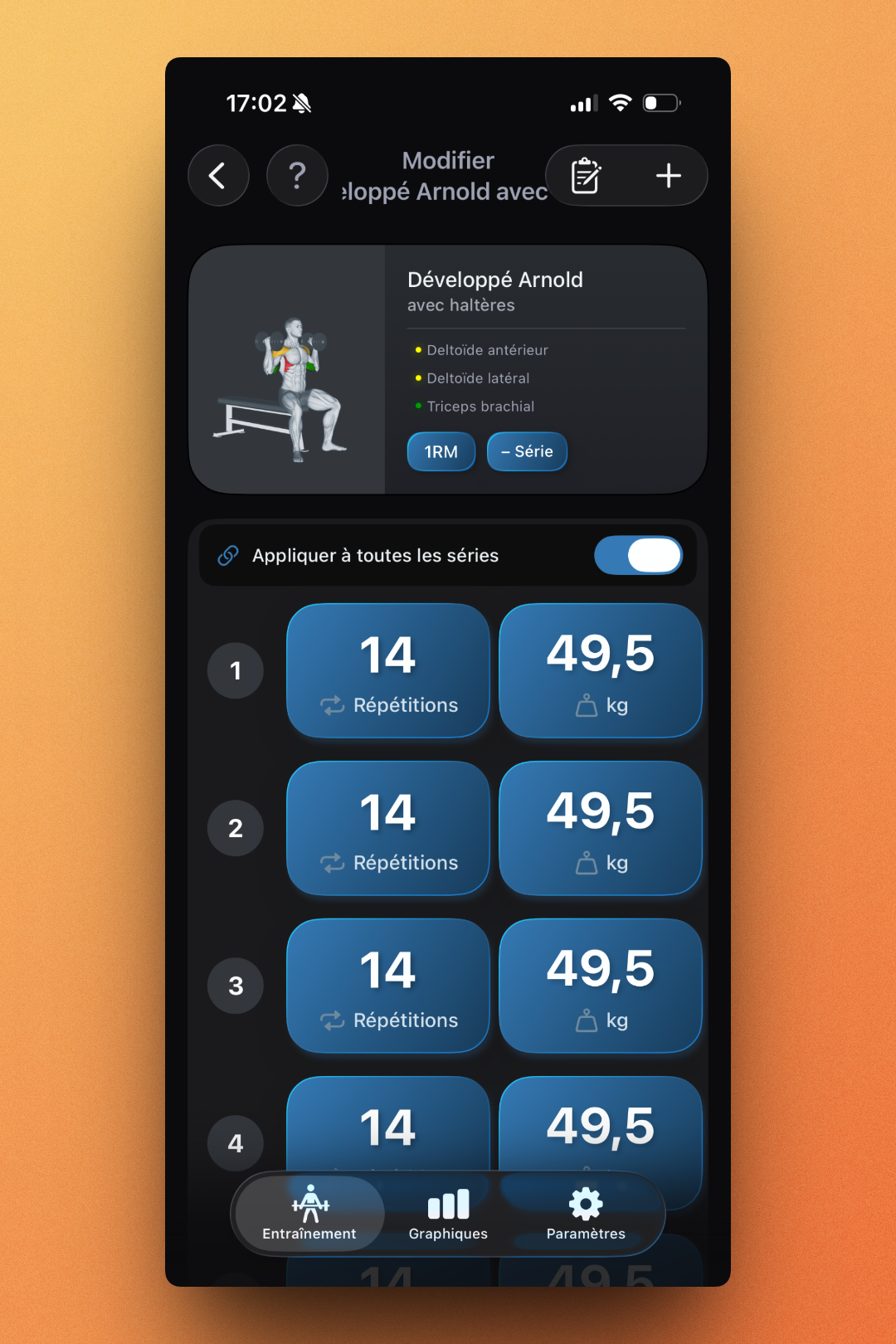
Configuring your sets is where VigiGym's "no typing required" philosophy really pays off. Instead of fiddling with a keyboard mid-workout, you adjust reps and weights using large, glove-friendly sliders. The interface shows each set as a card with big, tappable numbers - perfect when your hands are chalked up or you're wearing gloves.
A particularly nice touch is the "Appliquer à toutes les séries" (Apply to all sets) toggle. When enabled, adjusting one set automatically updates all others - a huge time-saver when you're doing straight sets with consistent weight. The 1RM button lets you calculate your one-rep max and auto-adjust weights based on your training goal (hypertrophy, strength, or endurance).
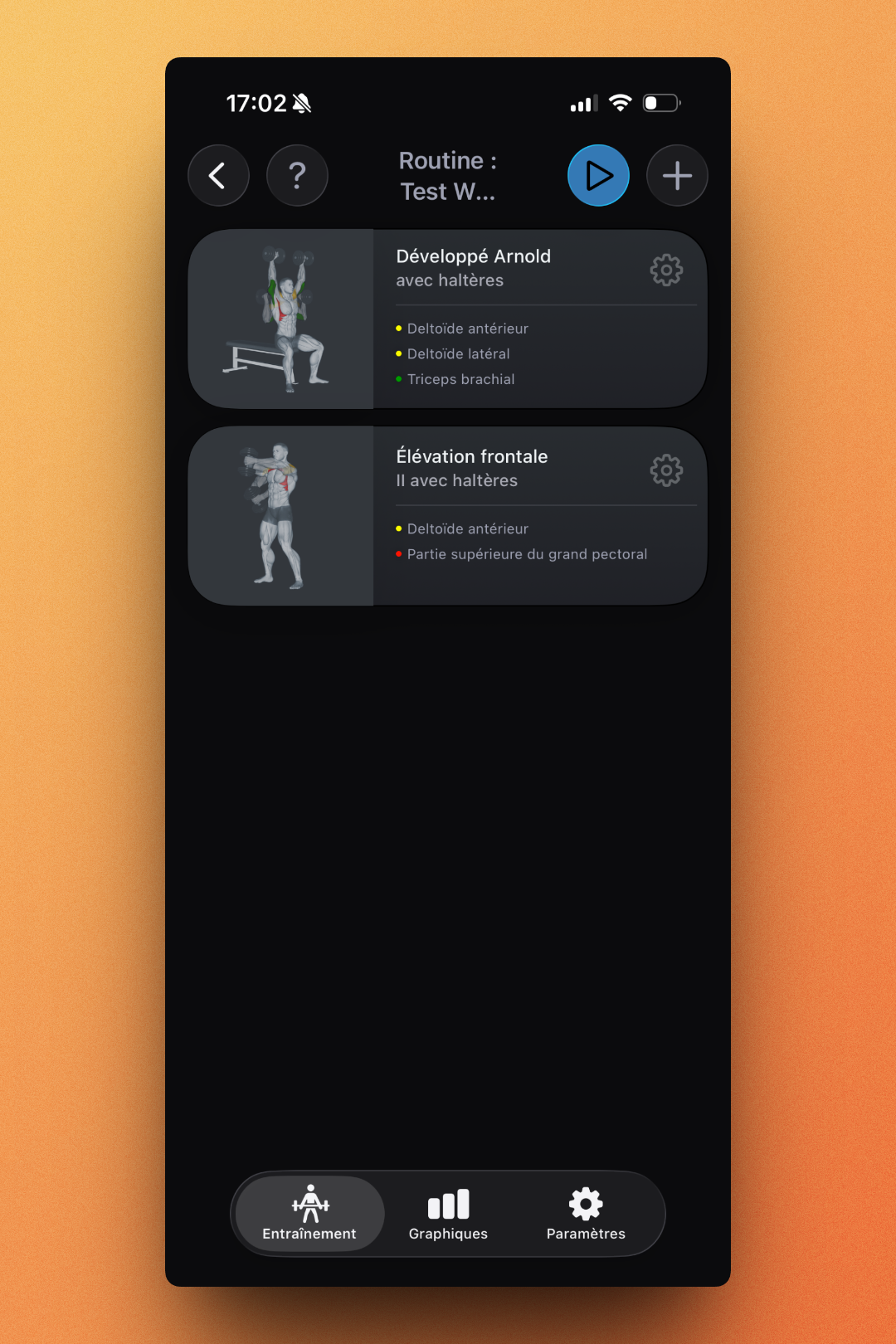
The routine view gives you a clean overview of your workout. Each exercise displays its muscle targeting with the same color-coding system, and you can quickly access settings via the gear icon. The play button at the top starts your workout session.
Active Workout Experience
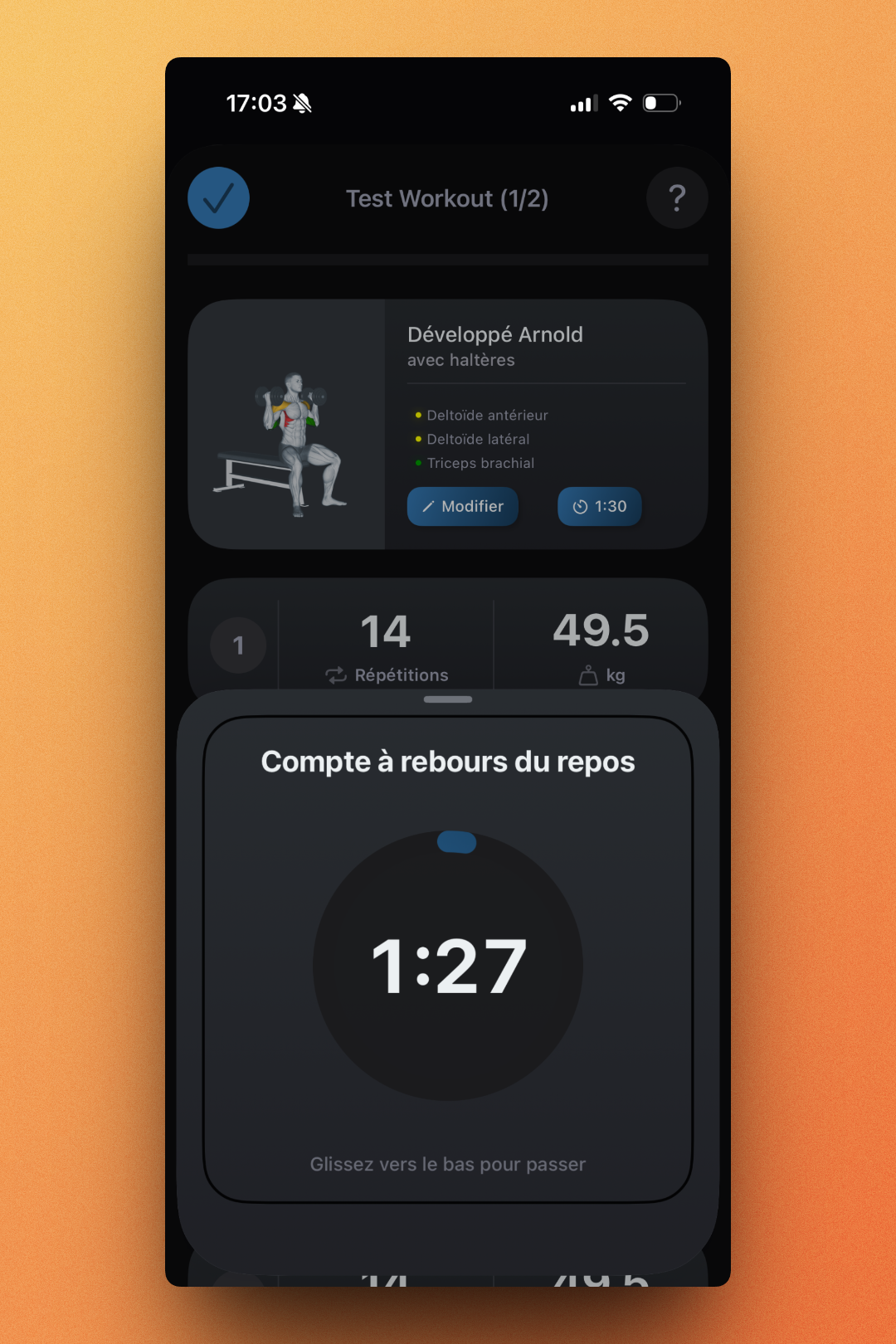
During an active workout, VigiGym shows exactly what you need: the current exercise, your target reps and weight, and a rest timer. The timer interface is beautifully designed - a large circular countdown that's visible from across the gym. When your rest period ends, you can swipe down to skip to the next set or let it auto-advance.
The exercise cards during workout display helpful information including the muscle groups being worked (color-coded dots), and you have quick access to modify the exercise or check the 1:30 rest timer setting. The "Modifier" button lets you adjust on the fly if you need to change weights or reps based on how you're feeling.
Statistics & Progress Tracking
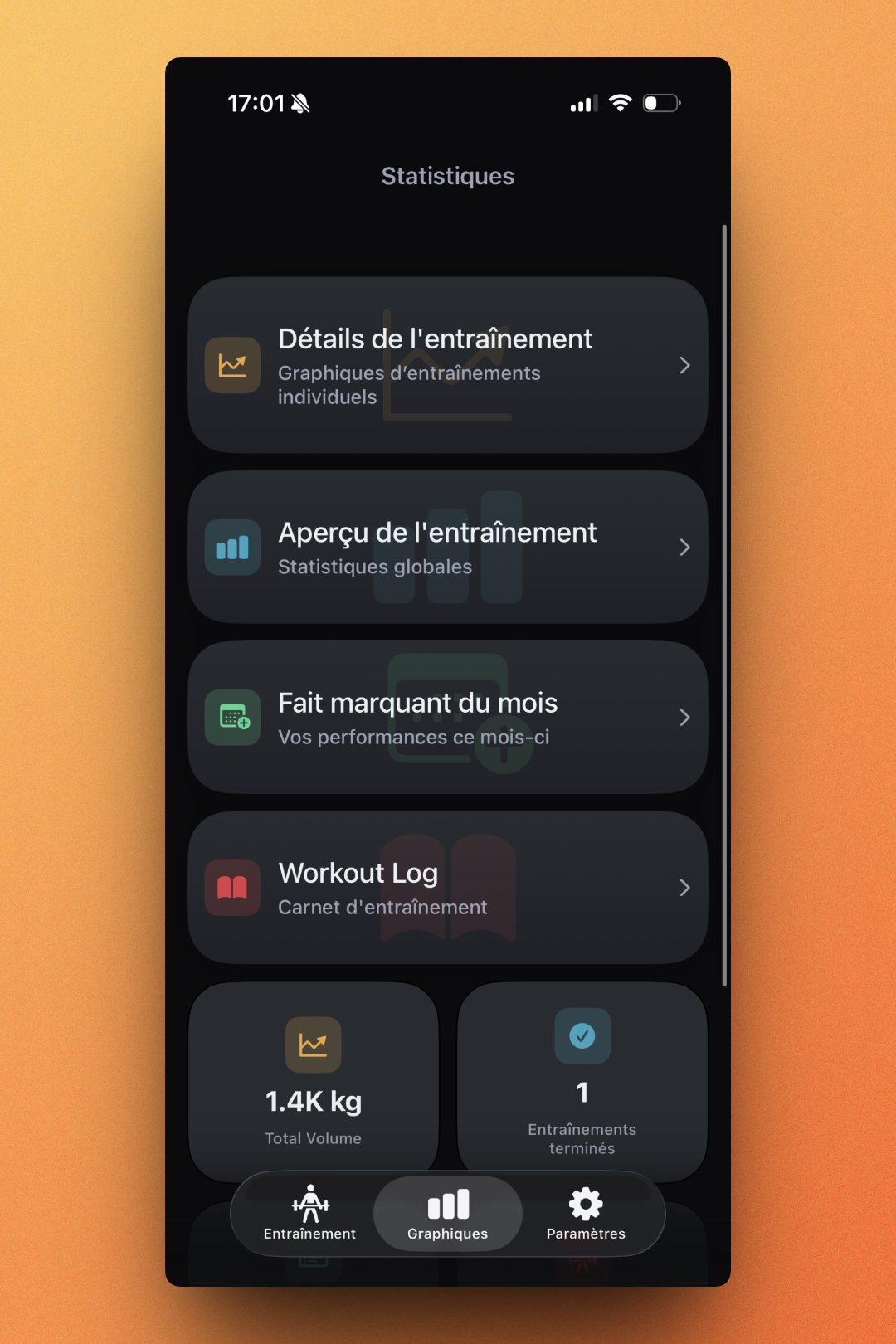
The Graphiques (Statistics) tab offers several ways to analyze your training:
→ Workout details: Individual workout graphs showing performance over time → Workout overview: Global statistics across all workouts → Monthly highlights: Monthly highlights and achievements → Workout Log: Complete training journal
The dashboard also shows key metrics at a glance - in my case, 1.4K kg total volume and 1 completed workout. These numbers grow as you log more sessions, giving you a motivating snapshot of your progress.
Drilling into specific exercises reveals detailed progress tracking. For each movement, you can see total sessions completed, average weight, and progress percentage since you started. This data-driven approach helps you identify plateaus and ensure progressive overload - essential for continued gains.
What Sets VigiGym Apart
After spending time with VigiGym, several things stand out:
100% Offline & Private
Your data stays on your device. No cloud sync means no subscription fees for basic storage, no privacy concerns, and no dependency on servers. In an age where every app wants your data, this is genuinely refreshing!
Solo Developer Passion
Achim Loobes built this app after decades of lifting and not finding anything that matched his needs. That personal investment shows in every detail - from the careful muscle illustrations to the thoughtful UX decisions. The website even features a personal note about his journey from coding in the '80s to creating VigiGym.
Native iOS Design
Built entirely in SwiftUI, VigiGym feels like it belongs on iOS. The animations are smooth, the interface respects iOS conventions, and it integrates seamlessly with Apple Watch. This isn't a cross-platform app shoehorned onto iPhone, it's designed specifically for Apple's ecosystem. For example, the navigation is built in Liquid Glass mode 😍!
Smart Set Detection
The app automatically recognizes when you're building supersets, drop sets, giant sets, or pyramid sets. No manual tagging required, it just understands your training logic and groups exercises accordingly. Handy :)!
Apple Watch Integration
VigiGym offers full workout tracking from your wrist. You can browse routines, start sessions, and log every set without touching your phone. For lifters who prefer to leave their phone in the locker, this is a genuine advantage over competitors that only offer limited watch functionality.
Pricing
VigiGym offers a 7-day free trial to test all features. After that:
Pro Monthly: $2.99/month Pro Annual: $29.99/year (best value)
Compared to competitors like Strong ($9.99/month) or Hevy ($9.99/month for premium), VigiGym's pricing is remarkably affordable. And remember= there's no cloud storage eating into that price, so you're paying purely for development and features.
Things to Consider
While VigiGym impressed me overall, there are a few considerations:
📱 iOS only: No Android version, and the developer has stated there are no plans for one. Android users will need to look elsewhere 😅.
🌐 No cloud sync: While this is a privacy feature, it also means you can't sync between devices or recover data if you lose your phone. Make sure to back up! I hope the ability to export/import data will be added soon.
📊 Growing exercise library: Even though there are 242 exercises, some niche movements might be missing. The developer is adding more, but it takes time since each requires custom muscle mapping. Don't hesitate to contact him if you're looking for a specific exercise 😊!
Conclusion
That's the end of this VigiGym review! After testing it extensively, I'm genuinely impressed by how well it executes on its minimalist promise.
Here's a recap of what I loved:
🎯 Laser focus on workout tracking without bloat 🎨 Beautiful muscle mapping system with color-coded targeting ⚡ Fast, friction-free logging with no typing required 🔒 100% offline and private, your data stays yours 💰 Very affordable pricing compared to competitors ⌚ Full Apple Watch integration 👨💻 Built by someone who actually lifts and understands the needs
Things to consider:
📱 iOS exclusive, no Android support planned ☁️ No cloud sync means no cross-device access 🏋️ Exercise library still growing
VigiGym proves that sometimes less really is more. In a market dominated by apps trying to do everything, there's real value in one that does the fundamentals exceptionally well. If you're a self-guided lifter who wants a clean, fast way to log workouts without the noise, VigiGym deserves a spot on your home screen.
The combination of thoughtful design, genuine passion from a solo developer, and affordable pricing makes this a standout choice for iOS users serious about their training. Give the 7-day trial a spin - you might find it's exactly the no-nonsense workout tracker you've been looking for 🚀!
In addition to this article, this product has also received a private review from our team, divided into 4 categories. We don't share the content, but here are the numbers:

Bugs
& Issues

Feature Suggestions

UX/UI Improvements